
Introduction
Les outils décrits dans cette page sont des programmes communiquant avec votre BlackBerry via une interface USB.
Puisque le protocole utilisé par les BlackBerry n’est pas documenté par la companie Research In Motion, ces programmes sont expérimentaux et à utiliser à vos propres risques sans aucune garantie.
Prenez soin de faire une sauvegarde de vos données avec un autre programme si vous possédez des informations importantes !
barry
bidentify
« bidentify » est un simple outil pour détecter et lister les BlackBerry connectés à votre ordinateur.
[nicolas@Dahlia nicolas]$ bidentify -h
bidentify - USB Blackberry Identifier Tool
            Copyright 2005-2010, Net Direct Inc. (http://www.netdirect.ca/)
            Using: Barry library version 0.17 (little endian)

   -B bus    Specify which USB bus to search on
   -N dev    Specify which system device, using system specific string

   -h        This help
   -v        Dump protocol data during operation
[nicolas@Dahlia nicolas]$ bidentify
12345678, RIM BlackBerry Device
btool
« btool » est un outil beaucoup plus complet que « bidentify ». Il permet de manipuler les bases de données
sur le BlackBerry. Vous pouvez lister, afficher, modifier, supprimer le contenu des bases de données.
[nicolas@Dahlia nicolas]$ btool -h
btool - Command line USB Blackberry Test Tool
        Copyright 2005-2010, Net Direct Inc. (http://www.netdirect.ca/)
        Using: Barry library version 0.17 (little endian)
        Compiled without Boost support

   -b file   Filename to save or load a Barry Backup to (tar.gz)
   -B bus    Specify which USB bus to search on
   -N dev    Specify which system device, using system specific string

   -a db     Erase / clear database 'db' FROM device, deleting all
             its records.  Can be used multiple times to clear more
             than one DB.
   -c dn     Convert address book database to LDIF format, using the
             specified baseDN
   -C dnattr LDIF attribute name to use when building the FQDN
             Defaults to 'cn'
   -d db     Load database 'db' FROM device and dump to screen
             Can be used multiple times to fetch more than one DB
   -e epp    Override endpoint pair detection.  'epp' is a single
             string separated by a comma, holding the read,write
             endpoint pair.  Example: -e 83,5
             Note: Endpoints are specified in hex.
             You should never need to use this option.
   -h        This help
   -i cs     International charset for string conversions
             Valid values here are available with 'iconv --list'
   -I        Sort records before output
   -l        List devices
   -L        List Contact field names
   -m        Map LDIF name to Contact field / Unmap LDIF name
                Map: ldif,read,write - maps ldif to read/write Contact fields
                Unmap: ldif name alone
   -M        List current LDIF mapping
   -n        Use null parser on all databases.
   -p pin    PIN of device to talk with
             If only one device is plugged in, this flag is optional
   -P pass   Simplistic method to specify device password
   -s db     Save database 'db' TO device from data loaded from -f file
   -S        Show list of supported database parsers
   -t        Show database database table
   -T db     Show record state table for given database
   -v        Dump protocol data during operation
   -V        Dump records using MIME vformats where possible
   -X        Reset device
   -z        Use non-threaded sockets
   -Z        Use threaded socket router (default)

 -d Command modifiers:   (can be used multiple times for more than 1 record)

   -r #      Record index number as seen in the -T state table.
             This overrides the default -d behaviour, and only
             downloads the one specified record, sending to stdout.
   -R #      Same as -r, but also clears the record's dirty flags.
   -D #      Record index number as seen in the -T state table,
             which indicates the record to delete.  Used with the -d
             command to specify the database.
Pour obtenir la liste des bases données :
[nicolas@Dahlia nicolas]$ btool -t
Blackberry devices found:
Device ID: 0x20d0360. PIN: 12345678, Description: RIM BlackBerry Device, Name: BlackBerry Torch
Using device (PIN): 12345678
Database database:
    Database: 0x0 'PasswordKeeper Options' (records: 1)
    Database: 0x1 'PasswordKeeper' (records: 1)
    Database: 0x2 'VideoRecorder Options' (records: 1)
    Database: 0x3 'Camera Options' (records: 1)
    Database: 0x4 'Alarm Options' (records: 1)
    Database: 0x5 'Enhanced Gmail Plug-in' (records: 1)
    Database: 0x6 'Clock Options' (records: 1)
    Database: 0x7 'Alarms' (records: 0)
    Database: 0x8 'Tasks' (records: 3)
    Database: 0x9 'Browser Push Options' (records: 1)
    Database: 0xa 'Attachment Data' (records: 12)
    Database: 0xb 'Attachment Options' (records: 1)
    Database: 0xc 'MMS Messages' (records: 5)
    Database: 0xd 'MMS Options' (records: 1)
    Database: 0xe 'Tasks Options' (records: 1)
    Database: 0xf 'Secure Email Decision Maker' (records: 1)
    Database: 0x10 'Purged Messages' (records: 287)
    Database: 0x11 'Folders' (records: 6)
    Database: 0x12 'Folder Id' (records: 1)
    Database: 0x13 'SMS Messages' (records: 191)
    Database: 0x14 'Saved Email Messages' (records: 0)
    Database: 0x15 'PIN Messages' (records: 7)
    Database: 0x16 'Messages' (records: 622)
    Database: 0x17 'Mailbox Icon Management Options' (records: 1)
    Database: 0x18 'Phone Call Logs' (records: 56)
    Database: 0x19 'Phone History' (records: 34)
    Database: 0x1a 'Searches' (records: 22)
    Database: 0x1b 'Spell Check Options' (records: 1)
    Database: 0x1c 'Phone Options' (records: 1)
    Database: 0x1d 'Text Messages' (records: 31)
    Database: 0x1e 'Input Learning Data' (records: 49)
    Database: 0x1f 'WAP Push Messages' (records: 0)
    Database: 0x20 'Browser Options' (records: 1)
    Database: 0x21 'Browser Cache' (records: 5)
    Database: 0x22 'Browser Channels' (records: 0)
    Database: 0x23 'Browser Messages' (records: 0)
    Database: 0x24 'Browser Folders' (records: 2)
    Database: 0x25 'External Bookmarks' (records: 0)
    Database: 0x26 'Browser Bookmarks' (records: 13)
    Database: 0x27 'Recipient Cache' (records: 1)
    Database: 0x28 'Bluetooth Options' (records: 1)
    Database: 0x29 'Attachment Data - Calendar' (records: 0)
    Database: 0x2a 'Calendar Options' (records: 1)
    Database: 0x2b 'Memory Cleaner Options' (records: 1)
    Database: 0x2c 'Mobile Network Options' (records: 1)
    Database: 0x2d 'Memos' (records: 5)
    Database: 0x2e 'Shortcut Settings' (records: 1)
    Database: 0x2f 'EntryPoint Settings' (records: 86)
    Database: 0x30 'Theme Settings' (records: 1)
    Database: 0x31 'Profiles Options' (records: 1)
    Database: 0x32 'Recent Contacts' (records: 9)
    Database: 0x33 'Voice Activated Dialing Options' (records: 1)
    Database: 0x34 'Address Book Options' (records: 1)
    Database: 0x35 'Sounds' (records: 19)
    Database: 0x36 'Address Book - Last Used Hints' (records: 1)
    Database: 0x37 'Categories' (records: 2)
    Database: 0x38 'Message List Options' (records: 1)
    Database: 0x39 'MemoPad Options' (records: 1)
    Database: 0x3a 'Input Method Switcher Option' (records: 1)
    Database: 0x3b 'WLAN Profiles' (records: 6)
    Database: 0x3c 'Application Permissions' (records: 244)
    Database: 0x3d 'Default Content Handlers' (records: 0)
    Database: 0x3e 'Suretype options' (records: 1)
    Database: 0x3f 'Predictive Multitap options' (records: 1)
    Database: 0x40 'SpellCheckable options' (records: 1)
    Database: 0x41 'Content Store' (records: 0)
    Database: 0x42 'Default Service Selector' (records: 3)
    Database: 0x43 'Service Book' (records: 17)
    Database: 0x44 'Code Module Group Properties' (records: 78)
    Database: 0x45 'Time Zones' (records: 91)
    Database: 0x46 'Full-predictive options' (records: 1)
    Database: 0x47 'Input Method Options' (records: 21)
    Database: 0x48 'Configuration Channel' (records: 5)
    Database: 0x49 'Random Pool' (records: 1)
    Database: 0x4a 'Smart Card Options' (records: 1)
    Database: 0x4b 'Certificate Options' (records: 0)
    Database: 0x4c 'TLS Options' (records: 1)
    Database: 0x4d 'Firewall Options' (records: 1)
    Database: 0x4e 'Key Store Options' (records: 1)
    Database: 0x4f 'KeyStoreManager' (records: 1)
    Database: 0x50 'PGP Key Store' (records: 0)
    Database: 0x51 'Handheld Key Store' (records: 137)
    Database: 0x52 'Trusted Key Store' (records: 98)
    Database: 0x53 'AutoText Data Version' (records: 1)
    Database: 0x54 'AutoText' (records: 356)
    Database: 0x55 'RMS Databases' (records: 12)
    Database: 0x56 'Handheld Configuration' (records: 0)
    Database: 0x57 'Options' (records: 21)
    Database: 0x58 'Device Options' (records: 0)
    Database: 0x59 'Policy' (records: 1)
    Database: 0x5a 'CustomWordsCollection' (records: 840)
    Database: 0x5b 'Input System Properties' (records: 1)
    Database: 0x5c 'Location Based Services' (records: 0)
    Database: 0x5d 'Maps' (records: 3)
    Database: 0x5e 'Map Global Options' (records: 1)
    Database: 0x5f 'Map Locations' (records: 1)
    Database: 0x60 'Map Settings' (records: 1)
    Database: 0x61 'Diagnostic App Options' (records: 1)
    Database: 0x62 'File Explorer Options' (records: 1)
    Database: 0x63 'File Explorer Network Favorites' (records: 0)
    Database: 0x64 'File Explorer Network History' (records: 0)
    Database: 0x65 'Messenger Options (WLM)' (records: 1)
    Database: 0x66 'Messenger Options (AIM)' (records: 1)
    Database: 0x67 'Messenger Options (GoogleTalk)' (records: 1)
    Database: 0x68 'SQLite Keys' (records: 1)
    Database: 0x69 'TCP/IP Options' (records: 1)
    Database: 0x6a 'Quick Contacts' (records: 0)
    Database: 0x6b 'Messenger Options (Yahoo!)' (records: 1)
    Database: 0x6c 'BlackBerry Messenger' (records: 1)
    Database: 0x6d 'BIS Account Data' (records: 1)
    Database: 0x6e 'Bloomberg Settings' (records: 6)
    Database: 0x6f 'BBGroups' (records: 14)
    Database: 0x70 'DocsToGoCommonPrefs' (records: 1)
    Database: 0x71 'SlideshowToGoPrefs' (records: 1)
    Database: 0x72 'WordToGoPrefs' (records: 1)
    Database: 0x73 'SheetToGoPrefs' (records: 1)
    Database: 0x74 'Handheld Agent' (records: 629)
    Database: 0x75 'Address Book' (records: 151)
    Database: 0x79 'Calendar' (records: 60)
    Database: 0x7c 'Address Book - All' (records: 151)
    Database: 0x7d 'PIM Folder List - All' (records: 0)
    Database: 0x7e 'Secure Credentials - All' (records: 0)
    Database: 0x7f 'Calendar - All' (records: 69)
« btool » est capable d’interpréter le contenu de certaines bases de données. Pour lister les bases dont vous
pouvez interpréter les données :
[nicolas@Dahlia nicolas]$ btool -S
Supported Database parsers:
 (* = can display in vformat MIME mode)
   Address Book *
   Browser Bookmarks
   Calendar *
   Calendar - All
   Content Store
   Folders
   Memos *
   Messages
   Phone Call Logs
   PIN Messages
   Saved Email Messages
   Service Book
   SMS Messages
   Tasks *
   Time Zones

Supported Database builders:
   Address Book
   Calendar
   Calendar - All
   Content Store
   Memos
   Tasks
« btool » est donc capable de lire et d’écrire des données. Certains types de données peuvent être afficher
dans des formats standards (contacts, rendez-vous, notes, taches…)
Quelques exemples…
Pour afficher le contenu d’une base :
[nicolas@Dahlia nicolas]$ btool -d "Calendar - All"
Pour afficher le contenu de cette même base en utilisant le format « vevent » :
[nicolas@Dahlia nicolas]$ btool -V -d "Calendar - All"
Remarque : les données au format « vevent » peuvent être lues par d’autres outils.
Pour supprimer toutes les entrées d’une base de données :
[nicolas@Dahlia nicolas]$ btool -a "Calendar - All"
barrybackup
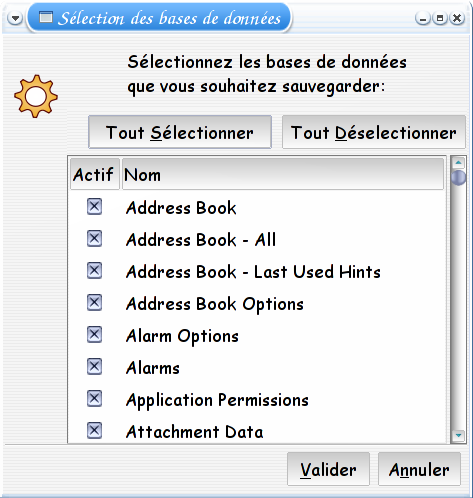
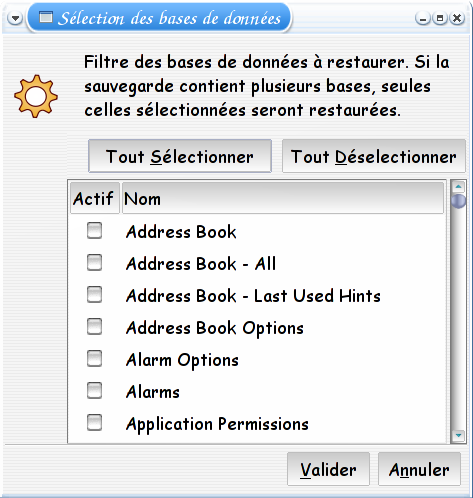
« barrybackup » est une interface graphique qui permet d’effectuer une sauvegarde ou une restauration de vos
données. Cet outil est très simple d’utilisation. Il présente deux écrans de configuration : un premier pour
sélectionner les bases à sauvegarder ; et un second pour sélectionner les bases à restaurer.
bjavaloader
« bjavaloader » est un autre outil qui permet de manipuler les applications de votre BlackBerry. Il est équivalent
à l’outil « javaloader.exe » présent dans la suite d’outil fourni par RIM.
[nicolas@Dahlia nicolas]$ bjavaloader -h
bjavaloader - Command line USB Blackberry Java Loader
        Copyright 2008-2009, Nicolas VIVIEN.
        Copyright 2005-2010, Net Direct Inc. (http://www.netdirect.ca/)
        Using: Barry library version 0.17 (little endian)

   -A        Save all modules found
   -a        Wipe applications only
   -i        Wipe filesystem only
   -f        Force erase, if module is in use
   -h        This help
   -s        List sibling in module list
   -p pin    PIN of device to talk with
             If only one device is plugged in, this flag is optional
   -P pass   Simplistic method to specify device password
   -v        Dump protocol data during operation

commands

   dir [-s]
      Lists modules on the handheld

   deviceinfo
      Provides information on the handheld

   load <.cod file> ...
      Loads modules onto the handheld

   save [-A]  ...
      Retrieves modules from the handheld and writes to .cod file
      Note: will overwrite existing files!

   wipe [-a | -i]
      Wipes the handheld
      Use Caution: Wiping filesystem will remove all data
                   such as messages, contacts, etc.
                   Wiping applications will remove all .cod files
                   on the device, including OS .cod files.

   resettofactory
      Reset IT policy to factory defaults
      Use Caution: Resetting IT policy to factory defaults will
                   also perform a filesystem wipe which will remove
                   all data such as messages, contacts, etc.

   erase [-f]  ...
      Erase module from handheld

   eventlog
      Retrieves the handheld event log

   cleareventlog
      Clears the handheld event log

   logstacktraces
      Dump the stack traces for all threads to the event log

   screenshot <.bmp file>
      Make a screenshot of handheld

   settime [yyyy-mm-dd HH:MM:SS]
      Sets the time on the handheld to the current time
      Or the time specified as an argument to settime
      If given as argument, current system timezone is assumed
Quelques exemples d’utilisation…
Pour prendre une capture d’écran :
[nicolas@Dahlia nicolas]$ bjavaloader screenshot screen.bmp
Pour installer une nouvelle application :
[nicolas@Dahlia nicolas]$ bjavaloader load MobileLevel.cod
Pour sauvegarder une nouvelle application :
[nicolas@Dahlia nicolas]$ bjavaloader save MobileLevel.cod
Pour obtenir la liste des applications :
[nicolas@Dahlia nicolas]$ bjavaloader dir
btardump
« btardump » est un outil qui permet de lire le contenu des sauvegardes effectuées faites par « barrybackup ».
[nicolas@Dahlia nicolas]$ btardump -h
btardump - Command line parser for Barry backup files
           Copyright 2010, Net Direct Inc. (http://www.netdirect.ca/)
           Using: Barry library version 0.17 (little endian)

   -d db     Name of database to dump.  Can be used multiple times
             to parse multiple databases at once.  If not specified
             at all, all available databases from the backup are
             dumped.
   -h        This help
   -i cs     International charset for string conversions
             Valid values here are available with 'iconv --list'
   -V        Dump records using MIME vformats where possible

   [files...] Backup file(s), created by btool or the backup GUI.
Quelques exemples d’utilisation…
Pour afficher le contenu d’une base :
[nicolas@Dahlia nicolas]$ btardump -d "Calendar - All" ~/.barry/12345678-20101230-202230.tar.gz
Pour afficher le contenu de cette même base en utilisant le format « vevent » :
[nicolas@Dahlia nicolas]$ btardump -V -d "Calendar - All" ~/.barry/12345678-20101230-202230.tar.gz
Remarque : les données au format « vevent » peuvent être lues par d’autres outils.
balxparse
« balxparse » construit à partir d’un OS une liste de toutes les applications que vous pouvez installer sur votre BlackBerry.
[nicolas@Dahlia nicolas]$ balxparse -h
balxparse - Command line ALX parser
        Copyright 2009-2010, Nicolas VIVIEN.
        Copyright 2005-2010, Net Direct Inc. (http://www.netdirect.ca/)
        Using: Barry library version 0.17 (little endian)

   -h        This help
   -i lang   Internationalization language
   -d path   OS path with all ALX files
   -o file   OS ALX filename (Platform.alx)

    ...
     Parse one or several ALX files.

   Language supported :
	en : English      ar : Arabic       ca : Catalan      cs : Czech
	de : German       sp : Spanish      fr : French       he : Hebrew
	hu : Hungarian    it : Italian      ja : Japanese     ko : Korean
Voici un exemple d’utilisation :
[nicolas@Dahlia nicolas]$ balxparse -i fr -d \
~/WINE/Program\ Files/Fichiers\ communs/Research\ In\ Motion/Shared/Loader\ Files/9800M_v6.0.0.246_P6.4.0.105
Vous pouvez également lire un fichier « .alx » :
[nicolas@Dahlia nicolas]$ balxparse -i fr MobileLevel.alx
bio
« bio » est un outil recent qui permet de lire ou de modifier des données sauvegardées ou d’accéder directement
aux données du BlackBerry. Cet outil combine les fonctionnalités de « btool », « btardump », « brecsum » et « bs11nread »
mais il est plus simple d’utilisation ; et propose davantage de fonctionnalités.
[nicolas@Dahlia nicolas]$ bio -h
bio - Barry Input / Output
      Copyright 2010, Net Direct Inc. (http://www.netdirect.ca/)
      Using: Barry library version 0.17 (little endian)
      Compiled without Boost support

 Usage:  bio -i  [options...]   -o  [options...]

   -i type   The input type (Builder) to use for producing records
             Can be one of: device, tar, ldif, mime
   -o type   The output type (Parser) to use for processing records.
             Multiple outputs are allowed, as long as they don't
             conflict (such as two outputs writing to the same file
             or device).
             Can be one of: device, tar, ldif, mime, dump, sha1, cstore

 Options to use for 'device' type:
   -d db     Name of input database. Can be used multiple times.
   -A        Add all available device databases, instead of specifying
             them manually via -d
   -p pin    PIN of device to talk to
             If only one device is plugged in, this flag is optional
   -P pass   Simplistic method to specify device password
   -w mode   Set write mode when using 'device' for output.  Must be
             specified, or will not write anything.
             Can be one of: erase, overwrite, addonly, addnew

 Options to use for 'tar' backup type:
   -d db     Name of input database. Can be used multiple times.
             Not available in output mode.  Note that by default,
             all databases in the backup are selected, when reading,
             unless at least one -d is specified.
   -f file   Tar backup file to read from or write to

 Options to use for 'ldif' type:
   -c dn     Convert address book database to LDIF format, using the
             specified baseDN
   -C dnattr LDIF attribute name to use when building the FQDN
             Defaults to 'cn'

 Options to use for 'mime' type:
   -f file   Filename to read from or write to.  Use - to explicitly
             specify stdin/stdout, which is default.

 Options to use for 'dump' to stdout output type:
   -n        Use hex dump parser on all databases.

 Options to use for 'sha1' sum stdout output type:
   -t        Include DB Name, Type, and Unique record IDs in the checksums

 Options to use for 'cstore' output type:
   -l        List filenames only
   -f file   Filename from the above list, including path.
             If found, the file will be written to the current
             directory, using the base filename from the device.

 Standalone options:
   -h        This help
   -I cs     International charset for string conversions
             Valid values here are available with 'iconv --list'
   -S        Show list of supported database parsers and builders
   -v        Dump protocol data during operation
« bio », peut comme « btool », interpréter les données lues :
[nicolas@Dahlia nicolas]$ bio -S
Supported Database parsers:
 (* = can display in vformat MIME mode)
   Address Book *
   Browser Bookmarks
   Calendar *
   Calendar - All
   Content Store
   Folders
   Memos *
   Messages
   Phone Call Logs
   PIN Messages
   Saved Email Messages
   Service Book
   SMS Messages
   Tasks *
   Time Zones

Supported Database builders:
   Address Book
   Calendar
   Calendar - All
   Content Store
   Memos
   Tasks
Quelques exemples :
Pour lire des données depuis une sauvegarde :
[nicolas@Dahlia nicolas]$ bio -i tar -f ~/.barry/2377cea5-20101230-202230.tar.gz -d "Calendar" -o dump
Pour lire les mêmes données, mais en utilisant le format « vevent » :
[nicolas@Dahlia nicolas]$ bio -i tar -f ~/.barry/2377cea5-20101230-202230.tar.gz -d "Calendar" -o mime
Si vous voulez lire les données depuis votre BlackBerry :
[nicolas@Dahlia nicolas]$ bio -i device -d "Calendar" -o dump
ou encore :
[nicolas@Dahlia nicolas]$ bio -i device -d "Calendar" -o mime
Pour sauvegarder des données :
[nicolas@Dahlia nicolas]$ bio -i device -d "Calendar" -o tar -f calendar.tar.gz
Pour copier des données d’un BlackBerry vers un autre :
[nicolas@Dahlia nicolas]$ bio -i device -p 3009efe3 -d "Calendar" -o device -p 204062f3 -w erase -o dump
Pour modifier le contenu de votre BlackBerry :
[nicolas@Dahlia nicolas]$ bio -i device -d "Calendar" -o mime > /tmp/calendar.vcf
[nicolas@Dahlia nicolas]$ gedit /tmp/calendar.vcf
[nicolas@Dahlia nicolas]$ bio -i mime -f /tmp/calendar.vcf -o device -w erase


20 réponses à Utilisation de Barry